Playtest & publish
Test the published version and choose public or private visibility.
Start a playtest
Playtest uses the saved World version, not unpublished autosaved draft changes. Publish an update to test your latest edits. Use private visibility if you do not want other players to access it.
Select Playtest at the top to open the panel. Closing and reopening it on the same editor page lets you continue the playtest. Model generation during playtesting creates usage.
Inspect Stats and triggers
The playtest state panel shows the current Chapter, turn, and Character Stats. Trigger records help you check Stat changes, Achievements, and Bond Cards.
The state panel is for creator debugging; players do not see these Stat values directly. After changing the configuration, publish and start a fresh playtest to assess the new behavior.
Successful publication clears existing creator playtests, so the next playtest starts from the beginning.
Discovery and visibility
For published Worlds, visibility changes take effect immediately. A private World has a published version; draft edits still require publication to update that version.
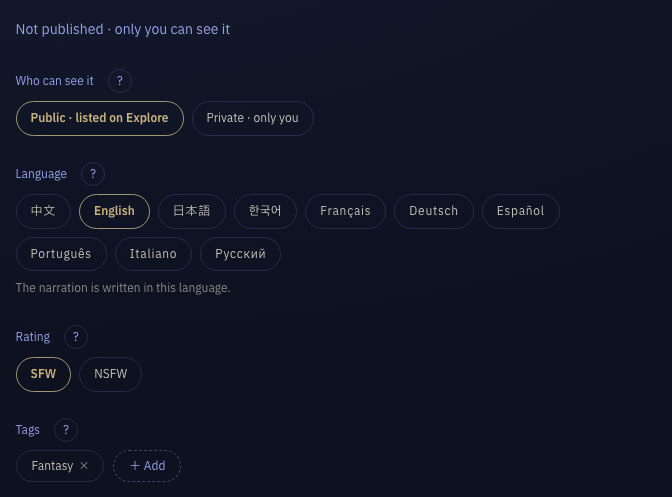
- Tags
- Pick from the vocabulary of the World’s language, at least one genre; who the player is goes in the POV group (AnyPOV, FemPOV, MalePOV), pairings (MLM, WLW) in the Orientation group; you can also type a new tag.
- Public
- The published World can appear in Explore Worlds and be accessed by other players.
- Private
- The World is published but accessible only to its creator, for testing or personal use.
- Language
- The main language used for generated narration. Existing content is not translated automatically.
Publish updates
Edits autosave as drafts. Publish when ready. World cover changes take effect immediately; other content updates require publication.
If publication fails, use the displayed messages to locate and correct the affected fields, then publish again.
Unpublish
After unpublishing, new players can no longer enter. Existing players of a public World can continue their sessions.
Unpublishing a private World seals any remaining sessions belonging to other players. Making the World public again does not restore those sessions.